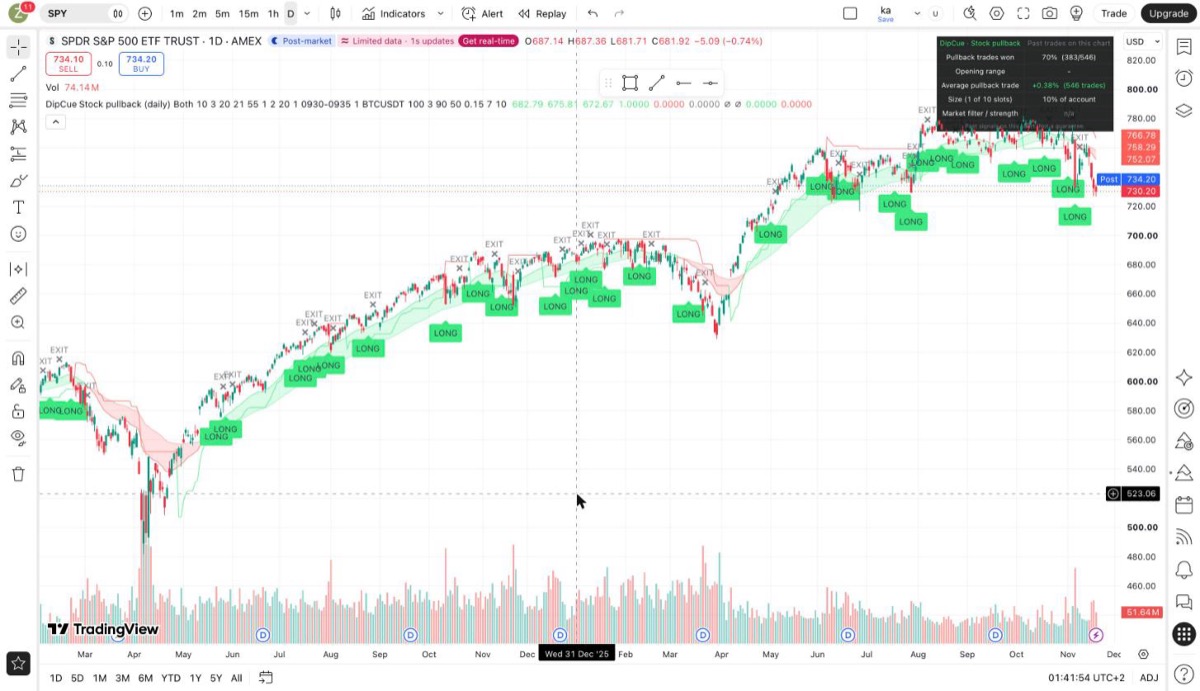
DipCue marks buy-the-dip setups and trend signals right on your TradingView chart, with a clear exit and a position size for every trade. No guessing, no screen-staring.

Pick the preset for your market and DipCue does the rest. Every signal fires on a closed candle, so it never repaints.
Buys short dips in US stocks and ETFs that are in a long-term uptrend, and exits on the first strong close. Trades often, holds 1–7 days.
Daily · Stocks & ETFsRides big crypto trends and stays in cash when Bitcoin is weak. Ranks coins by strength so you focus on the leaders.
Daily · CryptoTrades the breakout of the first 5 minutes of the US session, with a stop and two take-profit levels drawn for you.
5-min · Stocks & ETFsEvery trade gets an EXIT marker, so you always know when the setup is over.
The scorecard tells you how much to put in each trade, and shrinks size when a market gets wild.
Get a TradingView alert on your phone for every LONG and EXIT. No need to watch charts all day.
Every plan includes the indicator, all three presets, alerts, the PDF setup guide and the members hub.
No. DipCue works on the free TradingView plan. Real-time alerts on some markets may need a paid data plan from TradingView.
No. DipCue shows signals, exits and position sizes on your chart. You place trades yourself with your own broker or exchange.
No. Signals only appear once a candle has closed, and higher-timeframe data uses the previous closed bar.
US stocks and ETFs (Stock pullback, Opening range) and major crypto coins (Crypto trend).
After checkout on Whop, enter your TradingView username. Access to the invite-only script is granted automatically, then log out and back in to TradingView.
Yes, cancel anytime from your Whop account. Your access ends at the end of the period you paid for.